
How Much Does Home Security Cost? A Complete Cost Guide
Quick Answer
Home security costs break into two very different kinds of numbers: what you pay upfront (equipment, and installation if you go professional) and what you pay every month after that (monitoring, storage, and any financing payment). Across the market broadly, equipment runs anywhere from roughly $200 for a basic DIY starter kit to $2,000+ for a large, camera-heavy professionally installed system, and monthly costs range from $0 (self-monitored, no subscription) to $80+ (top-tier professional monitoring with live-agent video response). There is no single "average" number that means much, because DIY and professionally installed systems aren't the same product — one is hardware you own and monitor how you choose; the other is closer to a bundled service. This guide breaks down each cost component on its own, gives you a formula to calculate your specific number, and flags the costs most guides forget to mention. For brand-specific pricing, our [Vivint Cost] page and our Vivint comparison guides ([Vivint vs. ADT], [Vivint vs. SimpliSafe], [Vivint vs. Ring]) go deep on individual companies — this page stays intentionally brand-neutral.
Home Security Cost Breakdown
| Cost Category | Typical Cost Structure | What Affects It |
|---|---|---|
| Equipment | One-time purchase ($200–$2,000+) or financed into monthly payments | Number of sensors/cameras, brand, DIY vs. professional-grade hardware |
| Installation | $0 (self-install) to $100–$200+ (professional) | Whether the provider offers DIY, home size, wiring complexity |
| Monitoring | $0 (self-monitored) to $80+/month (top-tier professional) | Whether dispatch is included, camera integration, response features |
| Cameras | $0 (none) to hundreds per camera, plus storage fees | Number of cameras, cloud vs. local storage, video-verification features |
| Sensors (beyond base kit) | Typically $20–$50 per additional sensor | Home size, number of entry points, environmental sensor needs |
| Smart-home devices | Varies widely — locks, thermostats often $100–$250 each | Whether you want integration beyond the alarm itself |
| Maintenance / replacement | Usually low but recurring — batteries, occasional hardware swaps | Sensor count, battery type, hardware age |
Upfront Home Security Cost
What you pay before the system is actually running depends heavily on which installation model you choose. A DIY system's upfront cost is essentially just the equipment price — you're not paying for anyone's time. A professionally installed system's upfront cost is equipment plus a separate installation fee, which some providers currently waive as a promotion and others charge outright; either way, it's worth treating the "regular" installation price, not just a current promotional $0, as the number to budget around, since promotions are temporary by definition. Optional devices — extra cameras, a smart lock, an additional sensor for a detached garage — add to this upfront figure regardless of installation model.
Monthly Home Security Cost
This is the number most marketing leads with, and it's the most misleading in isolation. Monthly cost can include professional monitoring (which itself often has multiple tiers based on what's actually covered — cellular backup, video verification, live-agent response), cloud video storage if you have cameras, and — if you financed your equipment — a separate monthly equipment payment layered on top of monitoring. Not every system has every one of these fees: a fully self-monitored DIY setup can genuinely run $0/month, while a professionally installed system with required monitoring has a real monthly floor that doesn't go away.
Home Security Equipment Cost
Equipment cost breaks down by device category, and not every category is necessary for every home:
Control panel / hub — the central unit that connects everything; included with essentially every system, DIY or professional.
Door and window sensors — the core of perimeter detection; cost scales with the number of entry points in your home.
Motion sensors — interior coverage; useful for larger open spaces or as a backup layer.
Glass-break sensors — detect the specific sound/vibration of a broken window; more relevant for ground-floor windows in higher-risk areas than for every home.
Indoor and outdoor cameras — priced individually per device, with cost varying by resolution, field of view, and brand.
Doorbell cameras — a category of their own, priced separately from other cameras.
Smart locks — keyless, remote-controllable entry; a meaningful add if smart-home integration matters to you.
Smoke, CO, water, and freeze sensors — environmental monitoring beyond intrusion detection; availability and cost vary significantly by provider.
What drives the total up: more entry points requiring more sensors, more cameras, and any environmental sensors beyond the basics. What keeps it down: a smaller home with fewer entry points, and buying only the sensor types your specific property actually needs rather than a pre-bundled package with extras you won't use.
Home Security Camera Cost
Cameras deserve their own line item because they carry a cost dimension equipment alone doesn't: storage. A camera's hardware price is only part of the picture — many systems don't record or store footage at all without an active paid plan, meaning the camera functions as live-view-only until you add a subscription. Storage itself splits into cloud (an ongoing monthly fee, often priced per camera) and local storage (sometimes a one-time hardware purchase, with the trade-off of cycling out older footage after a set window rather than storing indefinitely). Wired cameras typically cost less to run long-term than battery-powered ones, at the cost of a more involved installation. If cameras are a priority, budget for storage as a real recurring cost, not just the camera's sticker price. (For specific camera and doorbell pricing across major brands, our [Vivint Cost] page and our brand comparison guides go into detail on individual providers.)
Professional Installation Cost
Where offered, professional installation typically includes a technician visit, physical placement and mounting of sensors and cameras, connecting the system to your home network and any cellular backup, and a walkthrough of the app and control panel. Cost varies by how many devices need placing and whether any wiring or permits are involved — a hardwired doorbell camera, for instance, can require an electrical step a battery-powered one doesn't. Not every provider charges the same way for this: some bundle installation into equipment cost, some charge it as a separate line item, and some offer it as an optional add-on rather than a requirement.
DIY Home Security Cost Structure
DIY systems shift installation cost from a fee to your own time. Equipment is typically designed for adhesive or minimal-hardware mounting rather than technician-grade installation, and setup commonly takes under an hour for a basic kit. This generally means a lower upfront total (no installation fee) and, often, no required ongoing monitoring subscription — you can frequently choose to self-monitor at $0/month or add a paid tier only for the specific features you want (recorded video, professional dispatch). The trade-off isn't really about money — it's about who's responsible for correct placement, and whether you're comfortable being the one who notices if a sensor stops working.
Professional Home Security Cost Structure
Professionally installed systems typically bundle equipment, installation, and monitoring into more of a single ongoing relationship than a one-time purchase — some require monitoring on every account rather than making it optional, which changes the cost conversation from "should I pay for monitoring" to "which tier of monitoring do I need." This model generally costs more over time than an equivalent DIY setup, in exchange for not being responsible for installation, placement, or troubleshooting yourself. (This page stays at the cost-structure level — for a full professional-vs-DIY decision framework beyond cost, see our upcoming Professional vs. DIY Home Security guide.)
Home Security Monitoring Cost
Monitoring cost varies more than any other line item, because "monitoring" isn't one product — it's a spectrum. At the low end, self-monitoring means alerts go to your phone and you decide how to respond, including whether to call emergency services yourself; this can be genuinely free. In the middle, basic professional monitoring typically adds 24/7 alarm verification and emergency dispatch coordination for a moderate monthly fee. At the top end, premium tiers can add camera-based verification, live-agent intervention (an actual person viewing your camera feed and responding to a verified event in real time), and cellular backup for when your internet is down. A pattern worth knowing before you shop: the cheapest advertised monitoring tier at many providers often excludes some of what people assume "monitoring" means by default — full alarm coverage, camera integration, or dispatch — so the realistic price to budget around is often one tier above the headline number, not the number itself. (This site's brand-specific comparison pages document this pattern in detail for individual providers.)
DIY vs. Professional Cost Example (Hypothetical)
The following is a hypothetical, illustrative example only — not an average, a quote, or a specific product's pricing. It's meant to show how the same rough coverage level can cost differently depending on installation model, using round numbers rather than any single brand's actual price list.
Hypothetical DIY setup: $250 equipment (hub, a few door/window sensors, one camera) + $0 installation + $10/month self-monitoring with camera recording = $250 first-year cost ($250 + $0 in monitoring if you skip a paid tier, or $250 + $120 if you add the $10/month tier).
Hypothetical professionally installed setup: $300 equipment + $150 installation + $30/month required monitoring = $810 first-year cost ($450 upfront + $360 in monitoring).
The gap here isn't really about equipment — it's installation and required monitoring. This is illustrative math to show the shape of the cost difference, not a claim that any specific real product costs exactly these numbers.
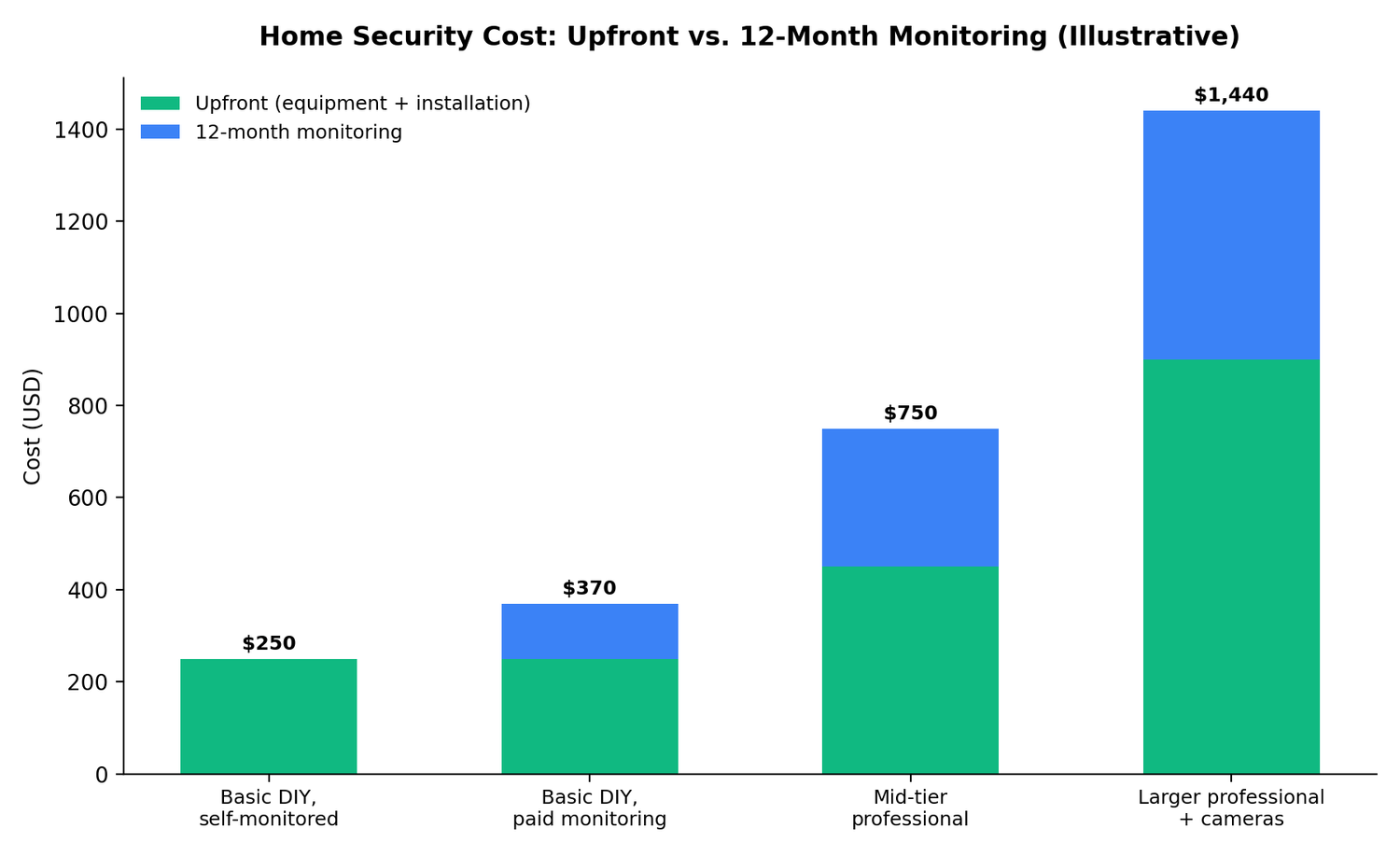
First-Year Home Security Cost
The formula: equipment + installation + (monthly recurring fee × 12) + any optional services = first-year cost.
These are illustrative scenarios built to show the range, not averages calculated from real transaction data — actual first-year cost depends on your specific equipment choices and provider.
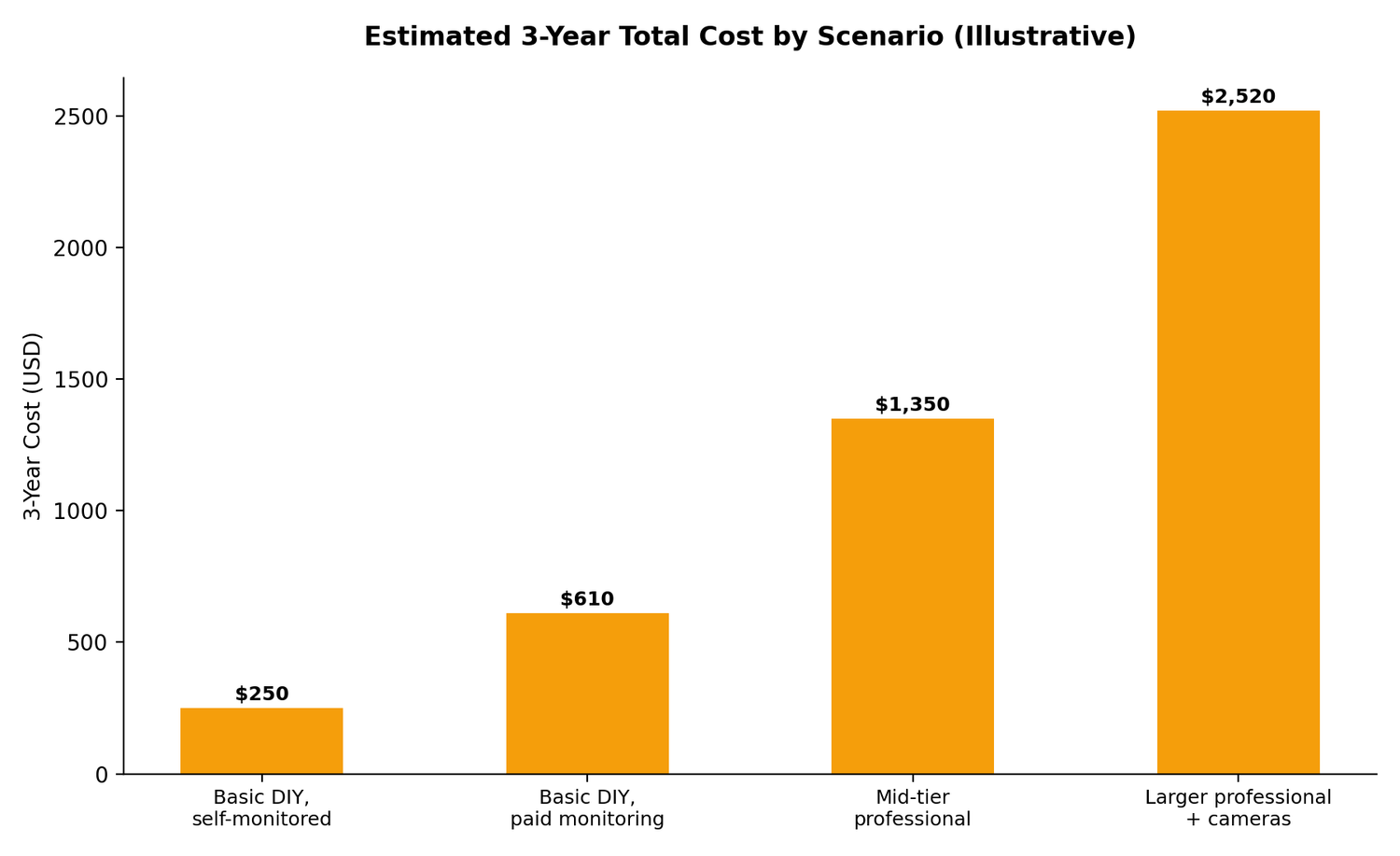
Long-Term Home Security Cost
A single year's cost understates what a system actually costs you if monitoring continues for years, which it usually does. The framework: Year 1 cost (as above) + (monthly fee × 12) for each additional year = cumulative cost. A $25/month monitoring plan alone adds $900 over three years on top of whatever equipment and installation cost in year one — often more than the equipment itself. This is why comparing providers on their advertised monthly price alone, without multiplying it out over a realistic multi-year horizon, tends to understate the real gap between options. Not every provider structures contracts the same way — some require a multi-year agreement, others are month-to-month throughout — so the "how many years" side of this formula depends entirely on the specific terms you're offered, not a universal default.
What Makes Home Security More Expensive?
More entry points requiring more sensors; a larger home needing more motion coverage; more cameras, especially outdoor units and doorbell cameras layered with storage fees; smart locks and other connected devices beyond the base alarm; professional installation instead of DIY; a premium monitoring tier with camera verification or live-agent response; ongoing cloud video storage; multiple properties needing separate systems; and financing equipment, which — even at 0% interest — often ties you to a longer service commitment than paying upfront would.
What Can Make Home Security Cheaper?
Choosing DIY installation over professional; buying only the sensors your specific property needs rather than a bundled package with extras; self-monitoring instead of a paid professional tier, where that trade-off makes sense for your risk tolerance; skipping cloud storage in favor of local storage or no camera recording at all; and comparing the regular (non-promotional) price before committing, since promotional pricing that reverts later can make an initially cheap system more expensive than it first appeared. It's worth being direct about one thing: cutting cost by skipping coverage you actually need — no sensors on a ground-floor window, no monitoring at all in a situation where dispatch genuinely matters — isn't a savings so much as a different risk decision. The goal is spending on what your specific home needs, not simply spending less.
Often-Overlooked Home Security Costs
A consolidated list worth checking before you commit to any provider, DIY or professional — not every provider charges every item below, but each is common enough across the industry to be worth asking about directly:
Activation or setup fees, separate from equipment and installation
Cloud video storage, often billed per camera rather than as one flat fee
Additional sensors beyond a base kit's included set
Battery replacement for wireless sensors and cameras over time
Equipment replacement or repair outside standard support windows
Cancellation or early-termination costs, which vary enormously between "no contract, cancel anytime" and "pay the remaining balance"
Moving fees or transfer costs if you relocate mid-contract
Service call fees for troubleshooting beyond what's covered by a standard plan
Cellular backup, sometimes included, sometimes a separate add-on
Smart-home subscriptions layered on top of the core security monitoring fee
Contracts and Financing
Broadly, providers fall into two camps: month-to-month with no long-term commitment, or a multi-year service agreement, sometimes tied specifically to whether you financed your equipment rather than to the monitoring itself. Financing equipment, even at 0% interest, is worth evaluating separately from its monthly payment amount — a 0% rate means no added interest cost, but it commonly comes paired with a longer minimum commitment than paying upfront would require, which is a real cost in flexibility even when it isn't a cost in dollars. This isn't legal advice; every provider's specific contract, cancellation policy, and financing terms differ, and reading the actual agreement — not just the sales pitch — is the only reliable way to know what you're committing to.
Home Security Cost by Property Type
Apartment or small rental: Typically needs fewer sensors (fewer entry points), and DIY, portable equipment is usually the better cost fit given the likelihood of moving — professional installation and multi-year contracts are a structurally awkward fit for a short-term living situation.
Small to medium single-family house: A middle ground — enough entry points to need a real sensor plan, but not necessarily requiring the largest equipment tier. This is where the difference between a "basic" and "standard" package tends to matter most.
Larger or multi-story house: More entry points, more square footage for motion coverage, and often a stronger case for multiple cameras and possibly professional installation, simply because the number of devices to place correctly goes up.
Large property with outbuildings (detached garage, guest house): Likely needs additional sensors or a secondary camera setup beyond what a standard single-structure package assumes — worth pricing separately rather than assuming one package covers a whole property.
We don't provide exact dollar figures by property type here, since actual cost depends on the specific equipment and provider you choose — this section is meant to help you anticipate which cost categories will scale for your specific property, not to predict a number.
How Much Should You Budget?
Rather than one number, think in tiers:
Basic security — core hub plus a handful of door/window sensors, self- or minimally-monitored. The lowest-cost entry point, DIY-first.
Standard security — a fuller sensor set covering all entry points, plus motion coverage, typically with a paid professional or self-monitoring tier.
Security plus cameras — the above, plus one or more cameras and the storage cost that comes with them.
Security plus smart-home features — adds locks, thermostats, or other connected devices beyond the core alarm.
Full professional service — technician-installed, required monitoring, typically the most complete but also the highest ongoing cost tier.
Which tier makes sense depends on your property, your risk tolerance, and how much you value not having to think about the system once it's running.
How to Calculate Your Real Home Security Cost
First-year cost = equipment + installation + activation/setup (if any) + (12 months × recurring monthly fee) + any optional services you're adding (extra cameras, storage, smart locks).
Ongoing annual cost, year two onward = (monthly recurring fee × 12) + any expected replacement or additional-equipment cost.
Run this formula against your actual quote, not a provider's advertised "starting at" number, and you'll have a realistic picture of what a specific system costs you — not just what it costs on paper.
Home Security Cost Checklist
Equipment (hub, sensors, base kit)
Additional sensors beyond the base kit
Cameras
Doorbell camera
Installation (professional fee, or your own time if DIY)
Monitoring tier and what it actually includes
Cloud or local storage
Smart-home devices (locks, thermostat)
Financing terms, if applicable
Contract length and cancellation terms
Moving/transfer fees
Expected replacement costs (batteries, hardware)
Questions to Ask Before Buying
What is the equipment cost, itemized by device? Is installation included, and is it required or optional? Is professional monitoring required, or can I self-monitor? What is the actual monthly fee, and what specifically does it include or exclude? Is there a contract, and what happens if I need to cancel or move? Who owns the equipment — me, or the provider? Are cameras included, or priced separately? Is cloud storage included in the monitoring fee, or billed on top? Are there cancellation or early-termination fees, and how are they calculated? Are additional sensors or devices extra, and at what cost?
Brand Examples of Different Pricing Models
Rather than re-deriving specific numbers here, it's worth knowing that major providers structure cost very differently from each other — some require monitoring on every account, others make it fully optional with a genuine $0/month tier; some offer 0% financing tied to a multi-year agreement, others sell equipment outright with no contract at all. Our [Vivint Cost] page and our [Vivint vs. ADT], [Vivint vs. SimpliSafe], and [Vivint vs. Ring] comparisons cover exactly these structural differences with current, verified pricing for each company — this page is meant to help you understand the cost categories themselves before you get into brand-specific numbers.
Frequently Asked Questions
How much does a home security system cost? Equipment alone typically runs $200–$2,000+ depending on system size and installation type; add installation (if professional) and monthly monitoring on top for the full picture.
How much does home security cost per month? Anywhere from $0 (self-monitored DIY) to $80+ (top-tier professional monitoring with camera verification and live-agent response), depending on what's included.
How much does home security installation cost? DIY installation is typically free (your own time); professional installation commonly runs $100–$200+, though some providers currently offer it as a promotion.
How much does professional home security cost? Generally higher than DIY across every category — equipment, installation, and required monitoring combine into a more service-like ongoing cost rather than a one-time purchase.
How much does DIY home security cost? Usually the lower-cost path: equipment only, often $200–$500 for a solid starter setup, with monitoring optional and sometimes free.
Does home security require a monthly fee? Not necessarily — self-monitored DIY systems can run with no subscription. Professionally installed systems often require monitoring as part of the service.
Are home security cameras included? Depends on the package — some bundle a camera or two, others sell them separately, and recording/storage is frequently a separate cost from the camera hardware itself.
Do home security systems have hidden fees? Not usually "hidden" in a deceptive sense, but there are commonly overlooked costs worth asking about directly — storage, additional sensors, cancellation terms, and battery replacement among them (see the full list above).
Is professional monitoring worth the cost? For households that want guaranteed dispatch and don't want to be the one deciding whether to call emergency services, yes. For lower-risk situations where self-monitoring is a comfortable fit, it may not be necessary.
Does home security equipment require a subscription to function? It depends on the device and provider — some cameras only offer live view without an active plan; some full systems require monitoring to operate at all. Confirm this specifically before buying if a no-subscription setup matters to you.
How much does a home alarm system cost? Using "alarm system" broadly, the same equipment/installation/monitoring breakdown in this guide applies — costs range from a couple hundred dollars for a basic DIY kit to several thousand over a few years for a larger, professionally monitored system.
What affects home security system pricing? Property size and entry-point count, number of cameras, installation type, monitoring tier, financing choices, and how many optional add-ons (smart locks, environmental sensors) you include.
How much should I budget for home security? Use the tier framework above to place yourself first (basic, standard, cameras, smart-home, full-service), then apply the first-year formula to your specific provider's quote rather than a generic average.
What should I ask about before buying a security system? See the full question list above — itemized equipment cost, whether monitoring is required, exact monthly fee inclusions, contract terms, and who owns the equipment are the most consequential.